TripScribe User Guide
TripScribe is a desktop app built for operations executives at tour agencies who manage client contacts, vendor bookings and itineraries on a daily basis. If you can type fast, TripScribe lets you manage contacts and itineraries much faster than other mouse-based apps, through a simple command-based interface with an informative and clean view.
New to TripScribe? Start with Quick Start to install the app and try your first commands.
Looking for a specific command? Jump to the Command Summary for a quick reference, or pick a feature from the table of contents below.
Table of Contents
- Quick Start
- Features
- Reading Command Format
- Viewing Help :
help - Adding a Contact :
addc - Adding an Itinerary :
addi - Listing Contacts and Itineraries :
list - Editing Contacts and Itineraries :
edit - Showing details of an itinerary:
show - Finding Contacts by Name :
find - Deleting a Contact or Itinerary :
delete - Clearing All Entries :
clear - Exiting TripScribe :
exit - Command Summary
- Data Management
- FAQ
- Known Issues
Quick Start
1. Set Up Java for TripScribe
TripScribe needs Java 17 or above to run. Here is how to check if you already have it installed:
Open a command terminal as follows:
Your computer Steps to open a terminal Windows Press Win + R, typecmd, press EnterMac Press Cmd + Space, typeTerminal, press EnterLinux Press Ctrl + Alt + TType the following command and press Enter:
java -versionIf the output shows
version "17"or higher, you are all set. If you get an error, download Java 17 by following one of these guides:
2. Download TripScribe
- Download the latest
tripscribe.jarfrom here - Move the file to a folder of your choice. For example, a folder called
TripScribeon your desktop.
3. Run TripScribe
- Open a command terminal, as described in Step 1.
- Navigate into the folder containing the
tripscribe.jarfile using thecdcommand:cd path/to/your/folder- For example:
- Linux/Mac:
cd ~/Desktop/TripScribe - Windows:
cd C:\Users\YourName\Desktop\TripScribe
- Linux/Mac:
- For example:
- Run TripScribe by typing the command
java -jar tripscribe.jarinto the terminal.
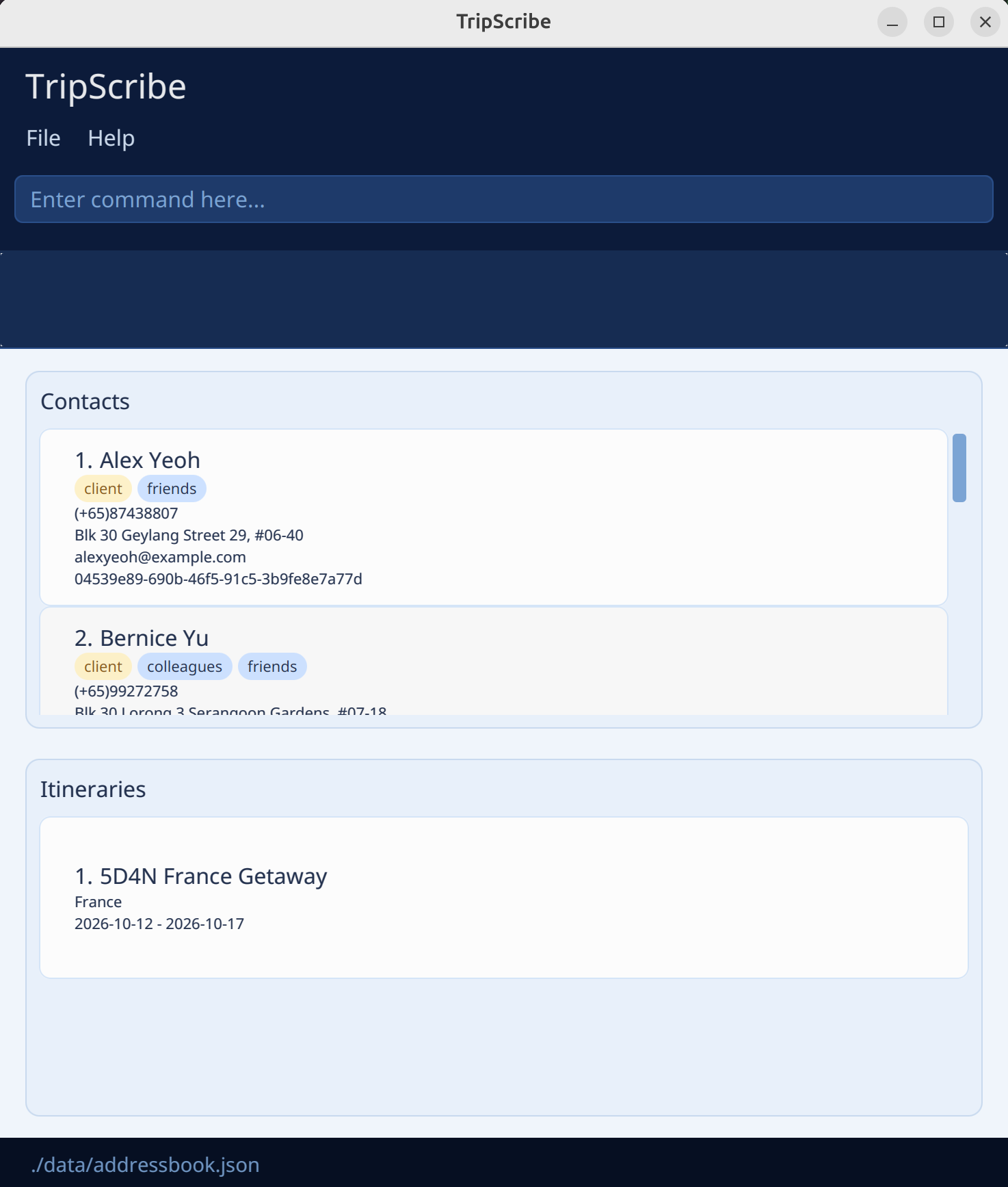
A pop-up window similar to the below should appear in a few seconds. On first start, the app will load sample data so you can explore its features right away.
4. Try Your First Commands
- Type a command in the command box and press Enter to execute it.
- Commands follow a consistent format throughout this guide. In brief, words in UPPER_CASE are values you supply, and items in [square brackets] are optional. For a full explanation, see Reading Command Formats.
- Try some example commands to get started:
| Action | Command |
|---|---|
| List all contacts | list /contact |
Add a contact named John Doe | addc r/client n/John Doe p/(+65) 98765432 e/johnd@example.com a/John street, block 123, #01-01 |
Add an itinerary named Bali Getaway | addi n/Bali Getaway dest/Bali from/2026-07-01 to/2026-07-05 |
| Delete the third contact shown in the current list | delete /contact 3 |
| Clear all contacts and itineraries | clear |
| Open the help window | help |
| Exit TripScribe | exit |
You can refer to the Features below to learn more details of each command.
Features
Reading Command Formats
Words in
UPPER_CASEare values you supply.- Example: In
addc r/ROLE,ROLEis entered asaddc r/client.
- Example: In
Items in square brackets are optional.
- Example:
n/NAME [t/TAG]can be entered asn/John Doe t/Busorn/John Doe.
- Example:
Inputs with
… after them can be used zero or more times.- Example:
[t/TAG]…can be used ast/Bus,t/Bus t/Speaks Englishetc.
- Example:
Information can be supplied in any order.
- Example: If the command specifies
n/NAME p/PHONE_NUMBER,p/PHONE_NUMBER n/NAMEis also acceptable.
- Example: If the command specifies
Additional parameters for commands that do not require them (such as
help,exitandclear) will be ignored.- Example:
help 123is interpreted ashelp.
- Example:
If you are using a PDF version of this document, be careful when copying and pasting commands that span multiple lines, as there may be formatting issues which affect the copied text.
Viewing help : help
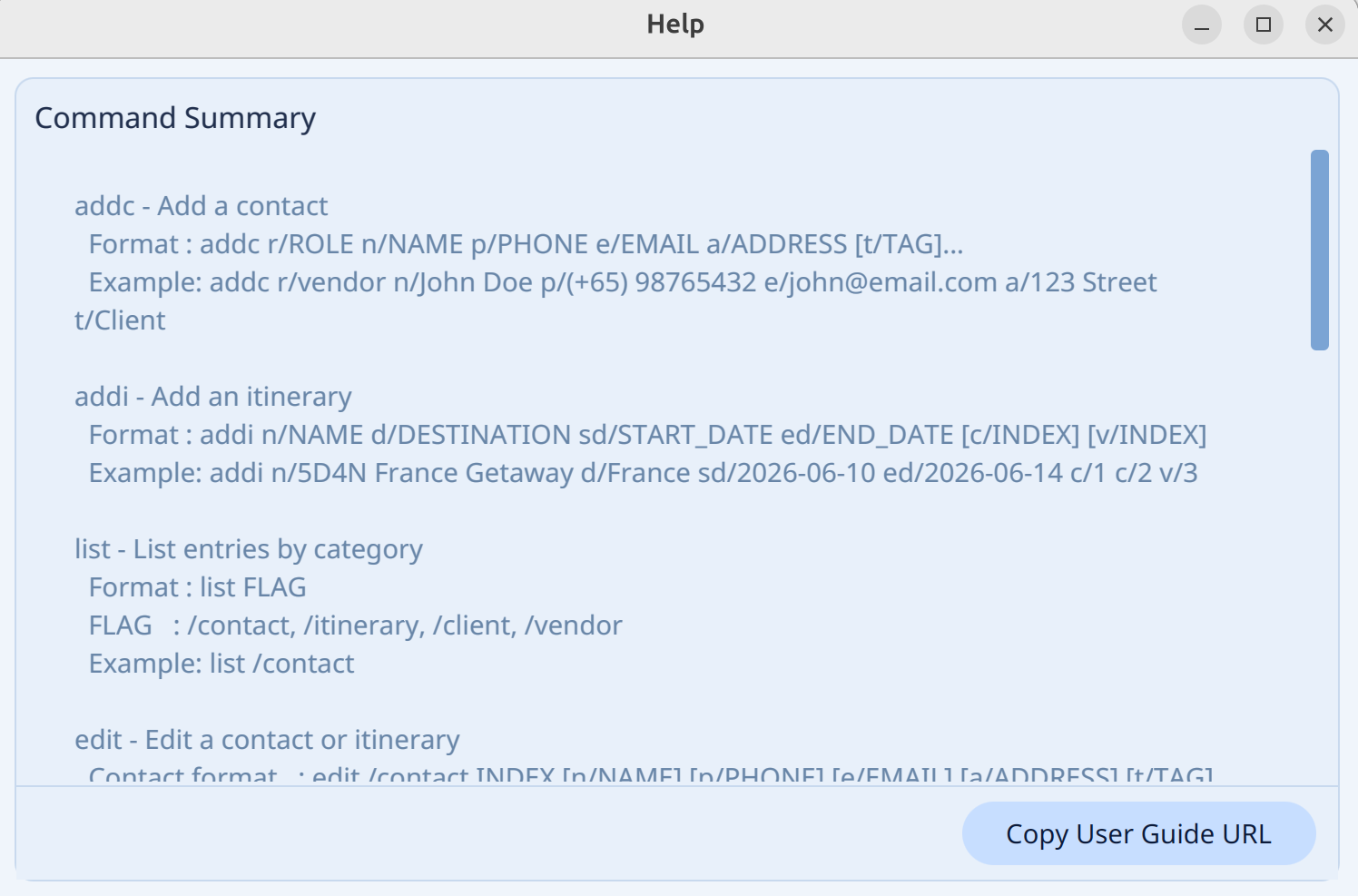
Open a help window that summarizes all commands and links to this guide.
Format:
help
Adding a Contact: addc
Add a contact to TripScribe.
Format:
addc r/ROLE n/NAME p/PHONE_NUMBER e/EMAIL a/ADDRESS [t/TAG]…
Things to note:
ROLEmust be eitherclientorvendor- A contact can have any number of tags (including zero)
- Phone numbers should follow the format
(+<Country Code>) <Phone Number>- Example:
(+65) 98765432.
- Example:
- TripScribe treats two contacts as duplicates if they share the same name and phone number. Duplicate contacts cannot be added.
Examples:
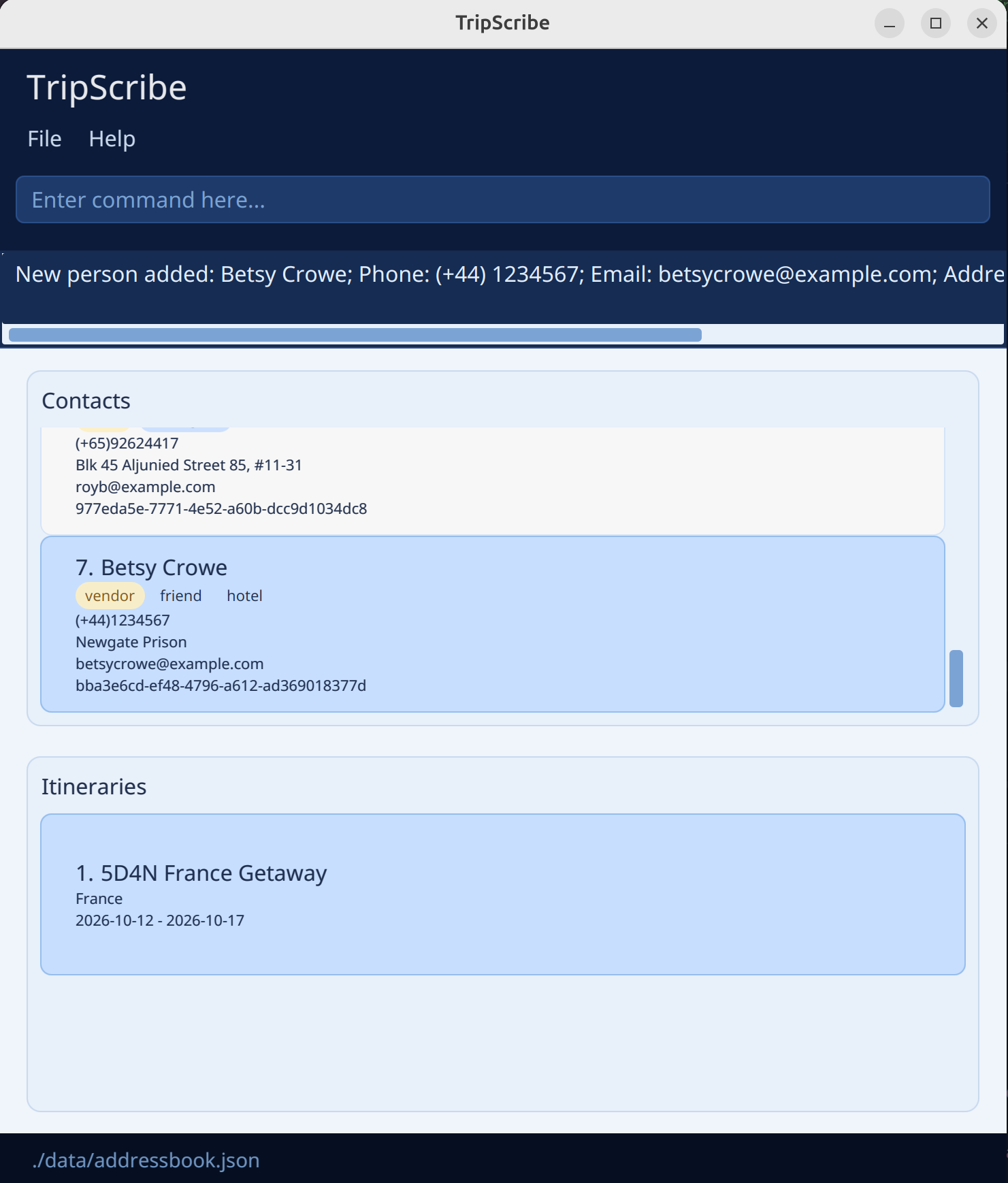
addc r/client n/John Doe p/(+65) 98765432 e/johnd@example.com a/John street, block 123, #01-01addc r/vendor n/Betsy Crowe t/friend e/betsycrowe@example.com a/Newgate Prison p/(+44) 1234567 t/hotel
Adding an Itinerary: addi
Add an itinerary to TripScribe.
Format:
addi n/ITINERARY_NAME dest/DESTINATION from/START_DATE to/END_DATE [c/CLIENT_INDEX]… [v/VENDOR_INDEX]…
Things to note:
ITINERARY_NAMEandDESTINATIONcannot be blank.- TripScribe treats two itineraries as duplicates if they share the same name (case-insensitive). Duplicate itineraries cannot be added.
- Example: Itineraries with the names
ISLAND TIME: BaliandIsland Time: Baliare considered duplicates.
- Example: Itineraries with the names
START_DATEandEND_DATEmust be in the formatyyyy-mm-dd.- Example:
20th March 2026should be written as2026-03-20.
- Example:
END_DATEmust be equal to or afterSTART_DATE.- Example:
from/2026-03-20 to/2026-03-19is not allowed.
- Example:
CLIENT_INDEXandVENDOR_INDEXare the indexes of the contacts in the current TripScribe window.- An itinerary can have any number of clients and vendors (including zero).
- If a contact is a client, you cannot add them as a vendor, and vice versa.
- Example:
c/2will fail if the contact at index 2 is a vendor.v/3will fail if the contact at index 3 is a client
- Example:
- If you want to add multiple clients or vendors into the itinerary, ensure that you indicate the correct prefix for each index.
- Example:
c/2 c/3 c/4 v/1 v/5 v/6will add the second, third and fourth contacts in the contact list and the first, fifth and sixth contacts in the vendor list (if they are of the correct role).
- Example:
Examples:
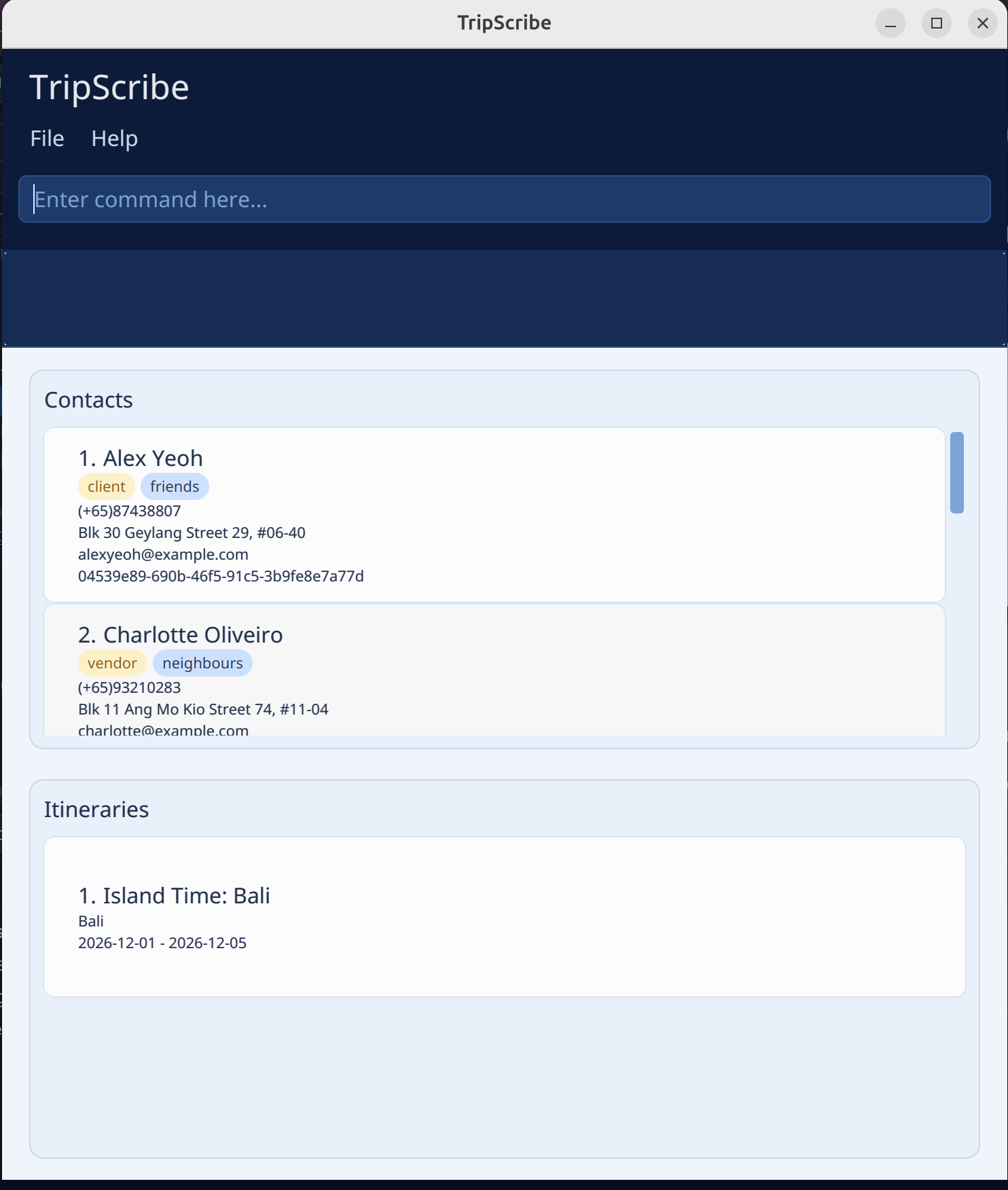
addi n/Island Time: Bali dest/Bali from/2026-12-01 to/2026-12-05addi n/5D4N France Getaway dest/France from/2026-10-12 to/2026-10-17 c/2 v/4addi n/3D2N Trip of China dest/China from/2026-05-02 to/2026-05-07 c/2 c/3 c/5 v/1 v/4
 Input | 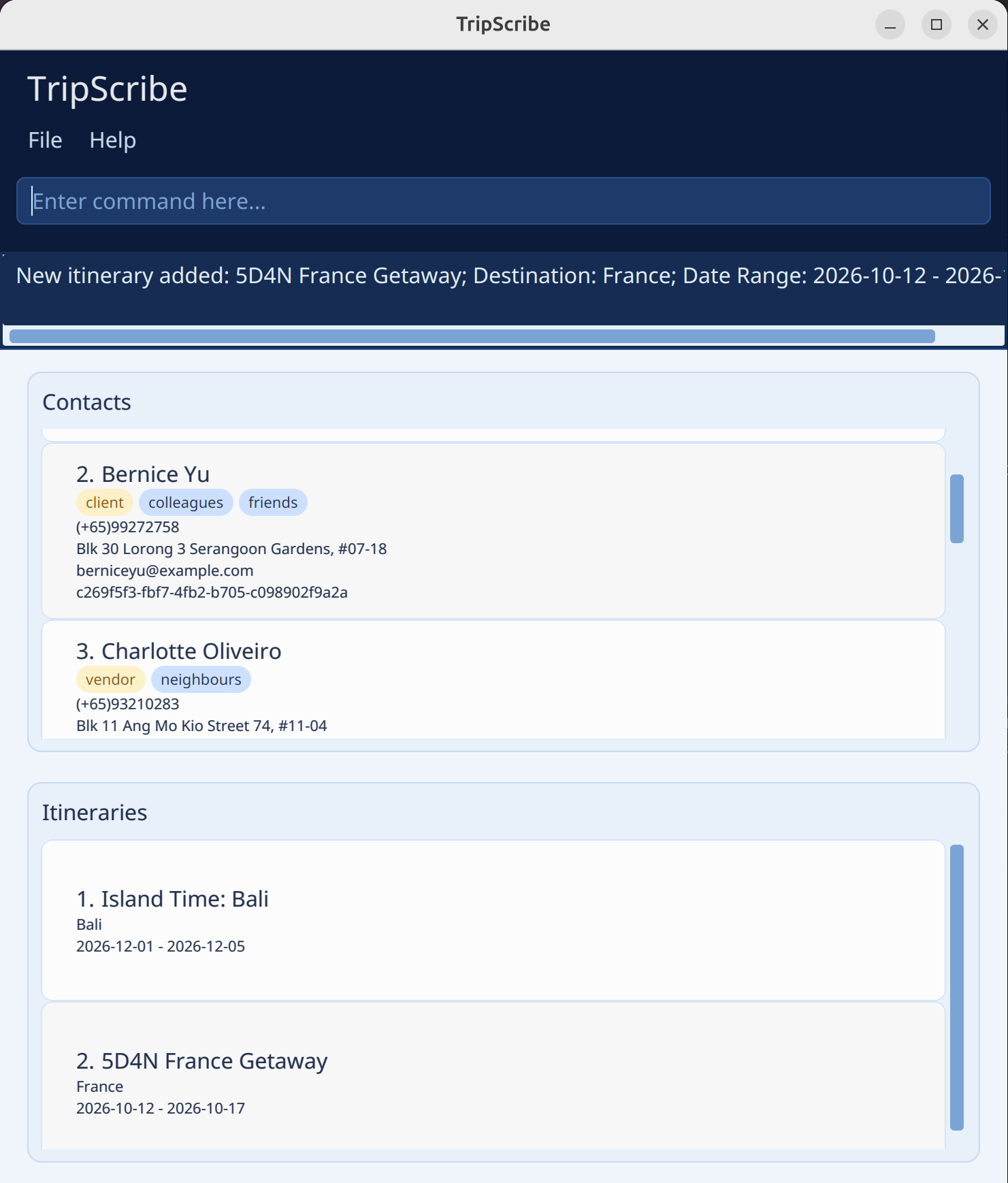 Expected Output |
|---|
Listing Contacts and Itineraries : list
See a list of contacts or itineraries based on the specified flag.
Format:
list /FLAG
Things to note:
FLAGspecifies the entry type you are listing. It must be one of:contact,client,vendor,itinerary,all.Flag What you see contactAll contacts, both clients and vendors clientOnly clients vendorOnly vendors itineraryAll itineraries |
all| All contacts and itineraries |When you view contacts (
/contact,/client,/vendor), TripScribe hides the itinerary panel.When you view itineraries (
/itinerary), TripScribe hides the contact panel.
Examples:
list /contactlist /clientlist /vendorlist /itinerarylist /all
Editing Contacts and Itineraries : edit
Edit an existing contact or itinerary in TripScribe.
Formats:
edit /contact INDEX [r/ROLE] [n/NAME] [p/PHONE] [e/EMAIL] [a/ADDRESS] [t/TAG]…
edit /itinerary INDEX [n/NAME] [dest/DESTINATION] [from/START_DATE] [to/END_DATE]
Warning: When editing contacts, editing tags replaces all existing tags of the contact, it does not add on to them.
Things to note:
- Edits the contact or itinerary at the specified
INDEX. INDEXis the index number shown in the displayed person or itinerary list. It must be a positive, non-zero number 1, 2, 3, …- You must include at least one field to change.
- You can remove all the person’s tags by typing
t/without specifying any tags after it. - When editing itineraries, you must ensure that the end date is after the start date.
Examples:
edit /contact 1 p/(+65) 91234567 e/johndoe@example.com- Edits the phone number and email address of the 1st person to be
(+65) 91234567andjohndoe@example.comrespectively. edit /contact 2 n/Betsy Crower t/- Edits the name of the 2nd person to be
Betsy Crowerand clears all existing tags. edit /itinerary 1 n/Bali 4D3N- Edits the name of the first itinerary to be
Bali 4D3N
- Edits the name of the first itinerary to be
Showing contacts by itinerary: show
Show details of an itinerary and the contacts associated with it in TripScribe.
Format:
show INDEX
Things to note:
- Shows contacts and itinerary details of itinerary at specified
INDEX. INDEXis the index number shown in the itinerary list. It must be a positive, non-zero number 1, 2, 3, …
Examples:
show 2- Shows details of the 2nd itinerary, and the contacts associated with it.
Finding Contacts by Keywords: find
Finds contacts whose fields match the given keywords. TripScribe supports both general search and multi-field search.
Formats:
General Search Format:
find KEYWORD [MORE_KEYWORDS]…
Multi-Field Search Format:
find [n/NAME_KEYWORDS] [p/PHONE_KEYWORDS] [e/EMAIL_KEYWORDS] [a/ADDRESS_KEYWORDS] [t/TAG_KEYWORDS]…
Warning:
Do not mix general search and multi-field search in the same command.
Example: find Hans p/9876 is invalid.
Things to note:
- The search is case-insensitive.
- Example:
hanswill matchHans
- Example:
- The order of the keywords does not matter.
- Example:
Hans Bowill matchBo Hans
- Example:
- Partial matches are allowed.
- Example:
Hanwill matchHans
- Example:
- In general search, a contact is returned if any keyword appears in any searchable field.
- In multi-field search:
- keywords within the same field are matched using
OR - keywords across different fields are matched using
AND
- keywords within the same field are matched using
Examples:
General Search:
find Johnreturns contacts whose name, phone, email, address, or tags containJohn.find alex davidreturns contacts containingalexordavidin any searchable field.
Multi-Field Search:
find e/example.comreturns contacts withexample.comin their saved email.find n/alex davidreturns contacts whose names containalexordavid.find n/alex p/996returns contacts whose names containalexand whose phone numbers contain996.find n/alex david p/992 281returns contacts whose names containalexordavidand phone numbers contain992or281.
Deleting a Contact or Itinerary : delete
Delete a specified contact or itinerary from TripScribe.
Format:
delete /FLAG INDEX
Things to note:
- This will delete the contact or itinerary at the specified
INDEX. FLAGspecifies the entry type you are deleting. It must be one of:contact,itinerary.INDEXis the index number shown in the displayed person or itinerary list. It must be a positive, non-zero number 1, 2, 3, …- When deleting a contact, the contact will be also be removed from any itineraries it is part of.
Examples:
list /contactfollowed bydelete /contact 2deletes the second contact in TripScribe.
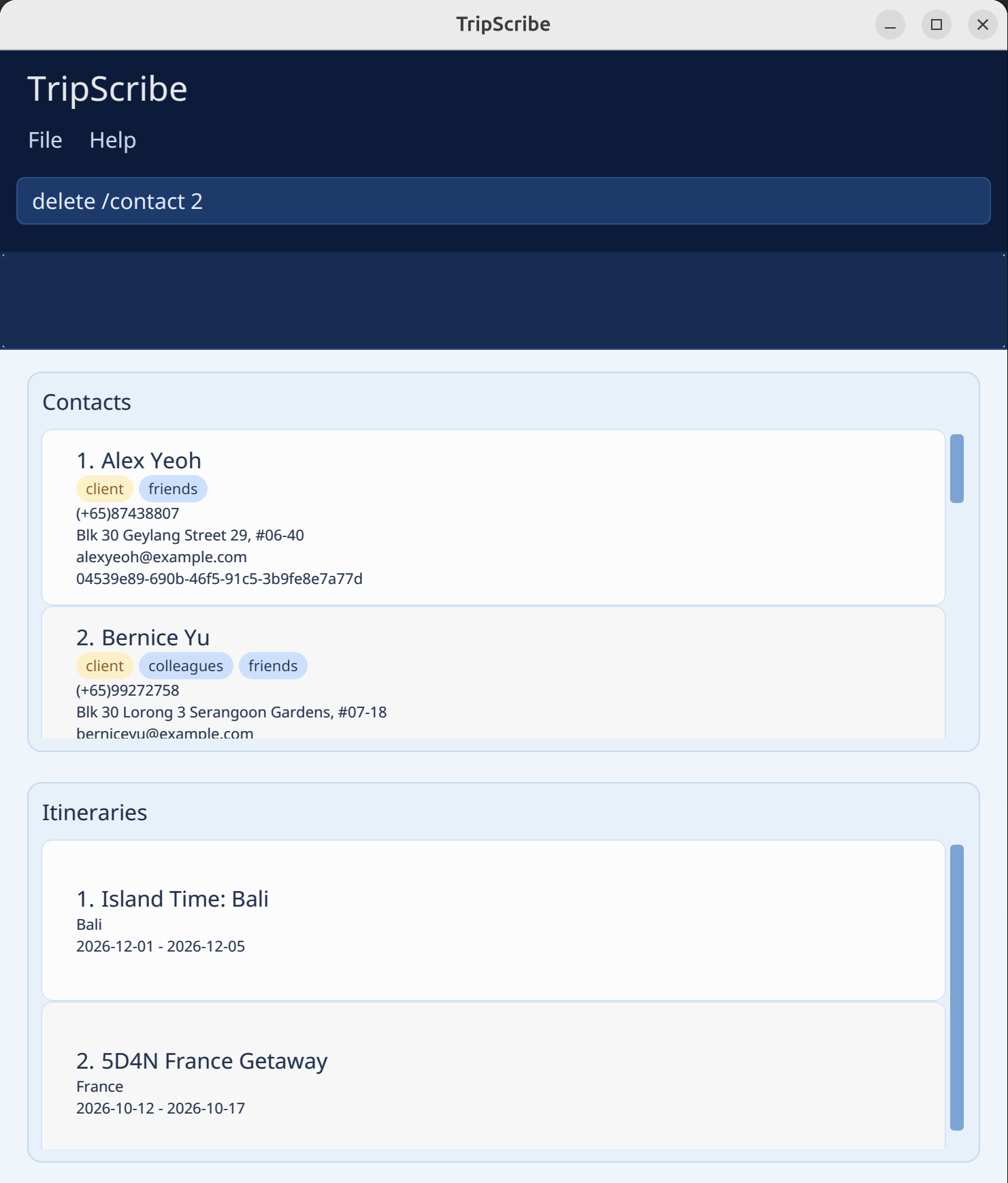 Input | 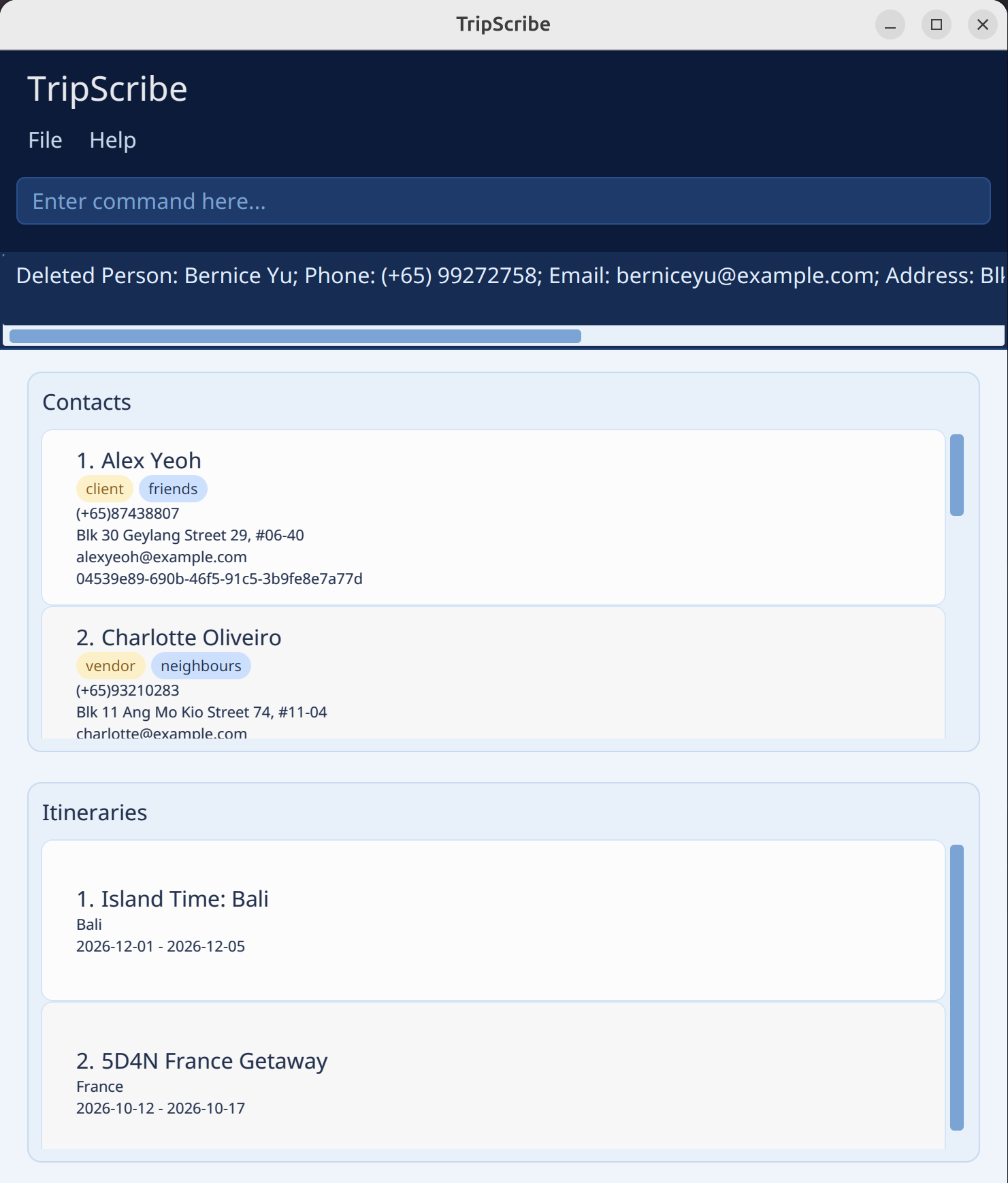 Expected Output |
|---|
list /itineraryfollowed bydelete /itinerary 1deletes the first itinerary in TripScribe.
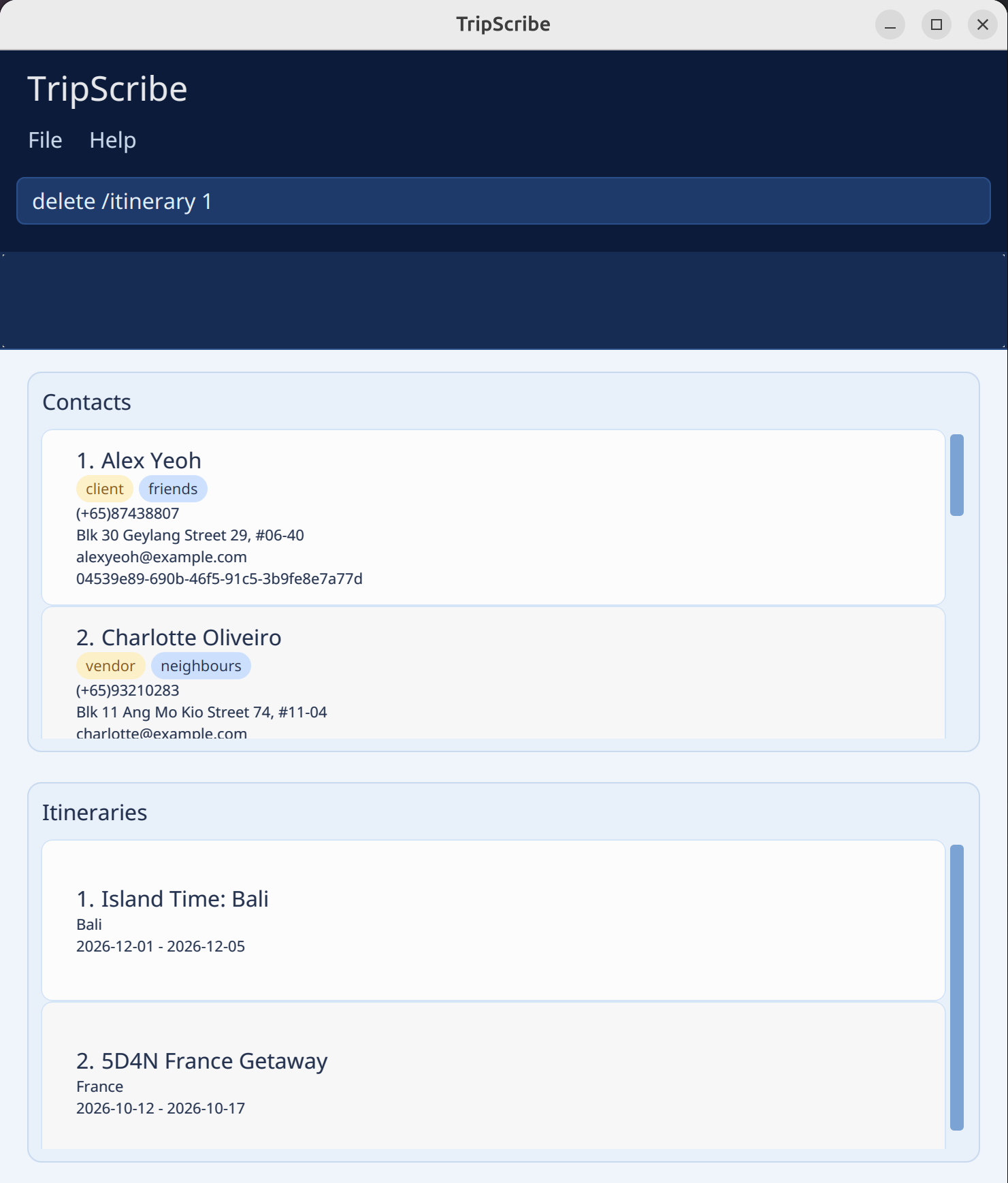 Input | 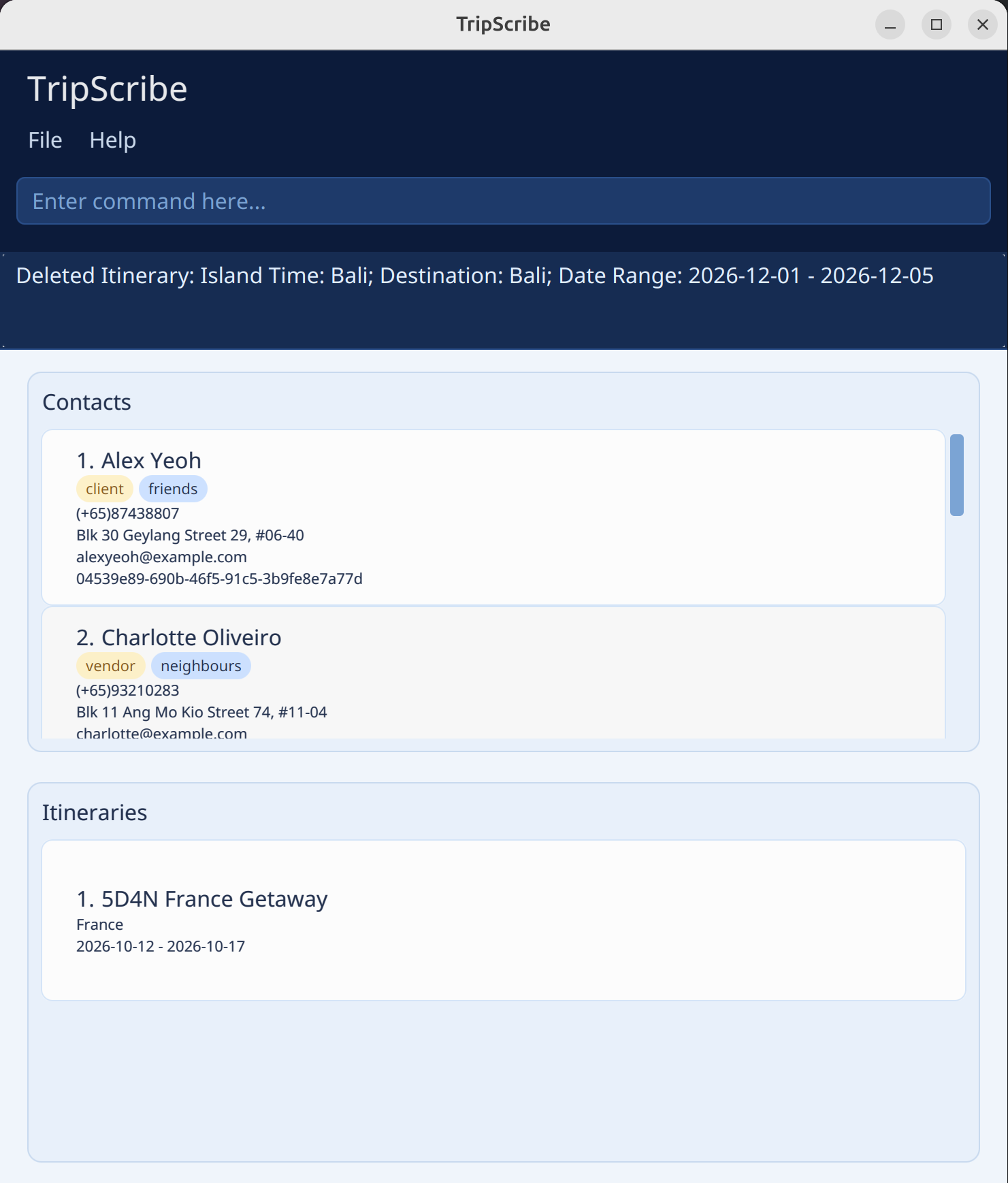 Expected Output |
|---|
Clearing All Entries : clear
Clear all contacts and itineraries from TripScribe.
Format:
clear
Exiting TripScribe : exit
Exit TripScribe.
Format:
exit
Command Summary
| Action | Format | Example |
|---|---|---|
| help | help | - |
| addc | addc r/ROLE n/NAME p/PHONE_NUMBER e/EMAIL a/ADDRESS [t/TAG]… | addc r/client n/James Ho p/(+65) 22224444 e/jamesho@example.com a/123, Clementi Rd, 1234665 t/friend t/colleague |
| addi | addi n/ITINERARY_NAME dest/DESTINATION from/START_DATE to/END_DATE [c/CLIENT_INDEX]… [v/VENDOR_INDEX]… | addi n/5D4N France Getaway dest/France from/2026-10-12 to/2026-10-17 c/2 v/4 |
| list | list /FLAG | list /contact |
| edit | edit /contact [n/NAME] [p/PHONE_NUMBER] [e/EMAIL] [a/ADDRESS] [t/TAG]… edit /itinerary INDEX [n/NAME] [dest/DESTINATION] [from/START_DATE] [to/END_DATE] | edit 2 n/James Lee e/jameslee@example.com |
| show | show INDEX | show 2 |
| find | find KEYWORD [MORE_KEYWORDS] find [PREFIX/KEYWORD] | find James Jake find n/Jane a/Apple Street |
| delete | delete /FLAG INDEX | delete /contact 3 |
| clear | clear | - |
| exit | exit | - |
Data Management
Saving Data
TripScribe saves your data in the hard disk automatically after any command that changes the data. You do not need to save manually.
Editing the Data File
TripScribe stores your data automatically as a JSON file found in [JAR file location]/data/tripscribe.json. If you are an advanced user, you can update data directly by editing this file.
Caution:
If you save the file in an invalid format, TripScribe will discard all invalid data and start only with valid data at the next run. Hence, you are recommended to create a backup of the file before editing it.
Furthermore, certain edits can cause TripScribe to remove entries (e.g., if a value entered is outside the acceptable range). Therefore, edit the data file only if you know what you are doing.
FAQ
Q: How do I transfer my data to another computer?
A: Install TripScribe on the other computer and replace the empty data file it creates with your file that contains the data of your previous TripScribe application folder.
Known Issues
- When using multiple screens, if you move the application to a secondary screen, and later switch to using only the primary screen, the GUI will open off-screen.
- To fix this, delete the
preferences.jsonfile created by TripScribe before running the application again.
- To fix this, delete the
- If you minimize the Help Window and then run the
helpcommand (or use theHelpmenu, or the keyboard shortcutF1) again, the original Help Window will remain minimized, and no new Help Window will appear.- To fix this, close the minimized Help Window and type the command again.